
Before you start with activities we advice you to adjust the privacy settings. Login>>>> and
Go to > Members Area > Community > Profile > Settings > Profile Privacy
The difference between Profile Privacy and Profile Visibility
Profile Privacy controls the visibility of your entire profile. It regulates whether you can be found in the members list or when searching for members.
Profile Visibility regulates who can see which detail information on your profile. E.g. Who can see your education or professional history.
How to set the Profile Privacy
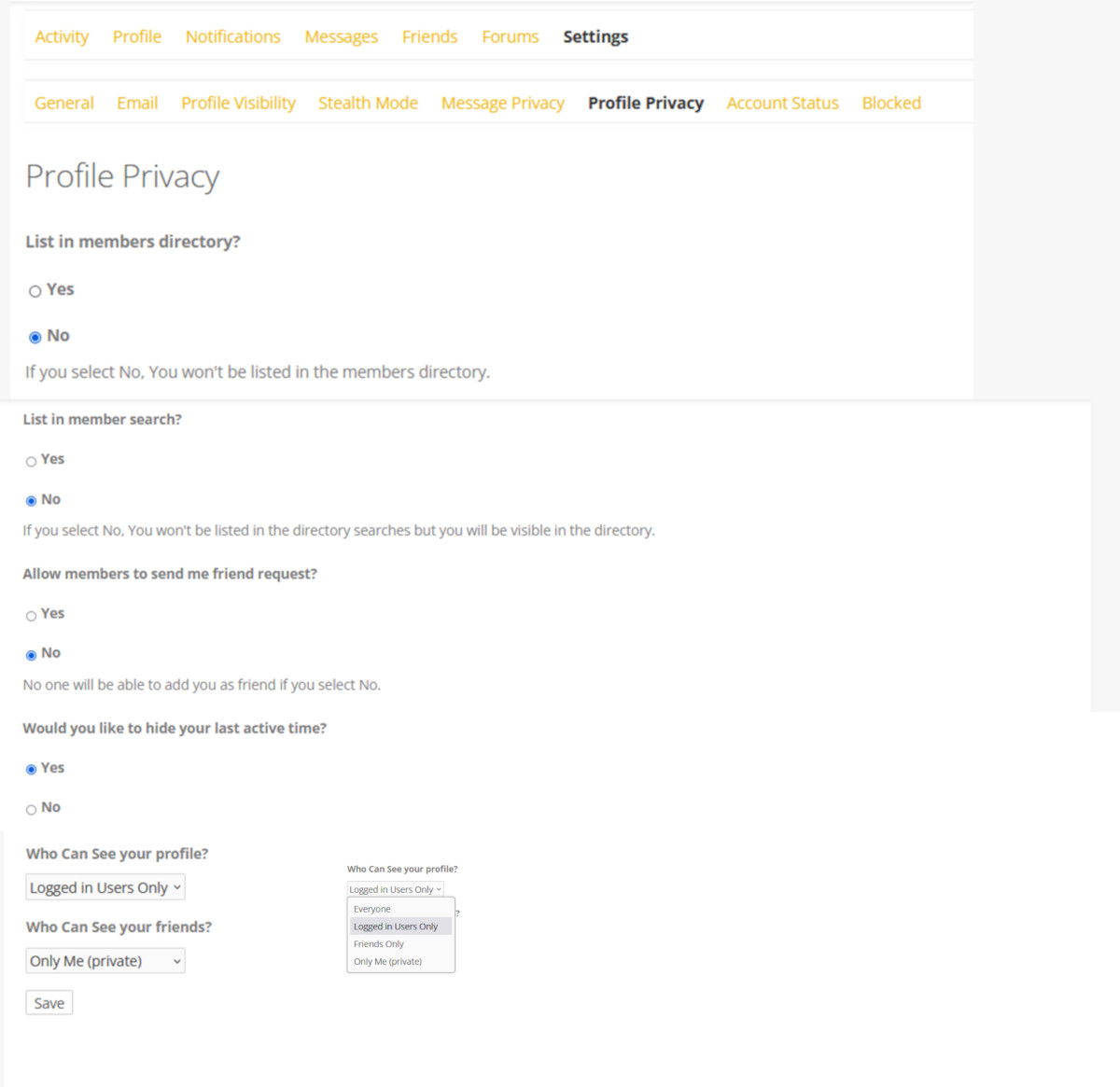 List in members directory?
Yes No
If you select “No,” you will not be listed in the Member-List. This is the automatically generated list of all registered members. You can decide whether you want to be found on this list or not. We recommend the setting “Yes”.
When would it make sense to select “NO”?
- If networking is not your priority, but you are only interested in participating in the forum discussions, uploading scientific dossiers or gaining access to the content pages.
- If you are only interested in the affiliate program and do not want to participate in the discussions or to get access to further content.
List in member search?
Yes No
At the top of the member list you will see the search bar. Here you can search for members instead of scrolling through the entire list. If you select No, others will not be able to find you using this search. Nevertheless, you will be listed and visible in the member directory.
Allow members to send me friend request?
Yes No
Friends are a central part of social networks and you can influence what information you see. If you select “No,” no one will be able to add you as a friend. If you set “No”, you will also not be able to send friend requests to others. Although the term “Add friend” would change to “Cancel friend request,” the target person will not receive your request.
Would you like to hide your last active time?
Yes No
Take a look at the member list and you will see “Active some time ago” under the name. You can hide this information. Hiding last active time also affects your visibility in the directory and other places, especially when last activity time is used as a filter.
Who can see your profile?
You can choose in the drop down menu who should be able to visit and see your profile with your information about education, professional career, etc. In your profile information, you can also select who should be able to see specific information bundles.
- Everyone
- Logged in members only
- Friends Only
- Only me
If you select “Everyone” even people who are not registered for the life-science Community could be able to find you via google or other search engines and would be able to see your profile. But – we want to offer you a community in which you can find a trustworthy space for exchanging opinions and experiences as well as for networking. For this reason, too, we offer premium members participation in the partner program. Because you as a member know best who fits into the community.
If you select “logged in members only“, all members registered on the WebSite of the life-science Community can see and visit your profile.
Friends Only – only your friends can visit and see your profile content.
Only Me – You are the single person who can see your profile entries. This makes sense as long as you have not yet edited your profile with content or not yet finished editing.
Who Can See your friends?
What aggrees to your communication or professional behaviour – providing insight into your network and to promote getting in touch or maintain discretion.
- Everyone
- Logged in members only
- Friends Only
- Only me